PHJOY App Download APK: Step-by-Step Android Installation Steps
Completing a PHJOY app download APK installation on Android takes 4 steps and roughly 90 seconds: grab the 7.68 MB file from the official download page, tap "Download anyway" when Chrome warns about APK files, toggle "Install unknown apps" for your browser, and sign in with your existing mobile number. Never register a second account after installing the app, or the duplicate-account filter will freeze your Peso withdrawals.
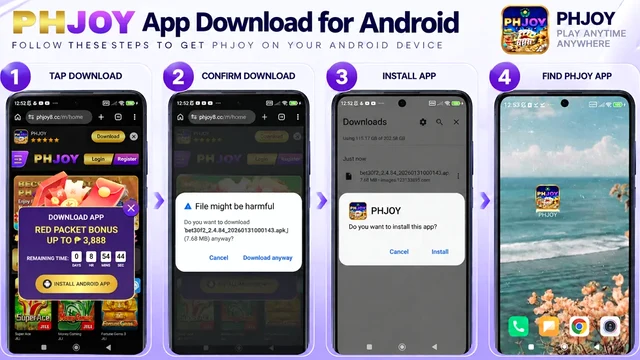




- Open the Official App Page: Visit the verified site in Android Chrome and tap the Android APK download button (7.68 MB).
- Confirm the Browser Prompt: Tap "Download anyway" if Chrome displays its standard warning for direct ".apk" files.
- Allow Browser Installation: When prompted, tap Settings and enable "Allow from this source" for Chrome, then tap Install.
- Log In With Your Existing Account: Open the app and enter your current username and password so your PHP balance and VIP tier sync.
Why Chrome Shows a Warning During Your PHJOY App Download APK
Almost every first-time Android user pauses at Step 2 when Chrome pops up a banner reading "File might be harmful." That message does not mean the file failed a virus scan; Android displays that exact generic text for 100% of .apk packages downloaded outside the Google Play Store.
What matters is verifying two facts before you tap "Download anyway": first, make sure you started the download from the official domain (not a random bit.ly link in an SMS), and second, check your Chrome Downloads bar to confirm the file size reads right around 7.68 MB.
Once the PHJOY icon appears on your home screen, go back to Settings > Apps > Special app access > Install unknown apps and toggle Chrome back to "Not allowed." Your installed casino app will keep working normally, and your phone stays protected against accidental drive-by downloads on other websites.
Fixing Common PHJOY APK Installation Errors in Minutes
Sometimes you finish downloading the file on Smart or DITO mobile data, tap it in your notification shade, and hit an Android system error instead of the install screen. Here is how to solve the three most common installation roadblocks on Philippine smartphones.
How to Fix "There Was a Problem Parsing the Package"
A parse error almost always happens when a momentary 4G signal drop cuts off the download at 5.2 MB or 6.4 MB instead of the full 7.68 MB. Open your phone's "Files" or "Downloads" folder, delete the incomplete .apk file, switch to a stable connection, and download a fresh copy until the full 7.68 MB completes.
How to Fix "App Not Installed as Package Conflicts With Existing Package"
This message appears when you have an older build of the app still sitting in your app drawer with a mismatched signature. Uninstall the old icon first - your Peso balance, GCash bindings, and VIP level are stored safely on the cloud server, not on your phone - and then run the new installer.
How to Fix Google Play Protect Blocking the Install
On newer Samsung OneUI and Xiaomi HyperOS phones, Play Protect may pause an unfamiliar APK and ask you to "Scan app" first. Tap "Scan app" so Android verifies the package does not contain malicious permissions, then tap "Install" once the scan finishes.
Real Peso Math: Claiming the App Download Angpao After Installing
Many players install the Android package specifically because the lobby advertises a "Download App Free Angpao up to ₱8,888." Let's look at the real numbers so you are not surprised when you open the red envelope inside the app.
First, the Angpao reward is randomly weighted: while the banner highlights the ₱8,888 top prize, most verified accounts receive a smaller starter drop between ₱8 and ₱88. Second, to prevent bot farms from installing the app on 50 emulators, the cashier usually requires at least one prior real-money deposit (such as ₱100 via GCash) and applies a 5x maximum cashout cap on winnings derived purely from free Angpao credits.
If you already registered on your mobile browser, use those exact same credentials after installing the APK. Creating a second account on the same phone hardware ID to chase a second Newcomer Bonus will flag both accounts and block your GCash withdrawals.
Next Steps After Installing the Android App
Ready to grab the verified file? Open the download section using our secure link below:
Get the Verified PHJOY Installer
For a broader look at mobile performance, visit our parent PHJOY Mobile App Guide. You can also inspect the 7.68 MB APK file permissions breakdown, learn how to update to the latest APK version and clear cache, or read the full rules for the ₱8,888 App Angpao promotion.
Frequently Asked Questions
How long does the PHJOY app download APK take on 4G mobile data?
Because the installer file is only 7.68 MB, it typically downloads in 5 to 15 seconds on a standard Smart, Globe, or DITO 4G connection, and the installation takes another 20 to 30 seconds.
Will uninstalling and reinstalling the APK delete my Peso balance?
No. Your PHP balance, active turnover progress, linked GCash or Maya account, and VIP tier are saved on the central casino server. As soon as you log back in with your username and password, everything appears intact.
Why does the APK file open as a text document when I tap it?
Some built-in browser download managers on Vivo or Oppo phones mislabel the file action. Open your phone's native "File Manager" or "Files by Google" app, go to the Downloads folder, and tap the 7.68 MB ".apk" file directly from there.
Can I install the same APK file on two different Android phones?
Yes, you can install the app on both your main phone and a backup phone and sign in to your single existing account, as long as you do not log in to both devices at the exact same second or create a duplicate account.