PHJOY on iPhone and iPad: Safe iOS Safari Shortcut Instructions
Because Apple iOS cannot run Android .apk files, the safest way to set up PHJOY on an iPhone or iPad is adding the official Safari Web App shortcut to your Home Screen in 3 taps: open the verified lobby in iOS Safari, tap the bottom Share icon, and select "Add to Home Screen." This creates a zero-megabyte native-style icon that runs every HTML5 JILI, PG Soft, and Evolution table at 60 frames per second without requiring risky enterprise device profiles.
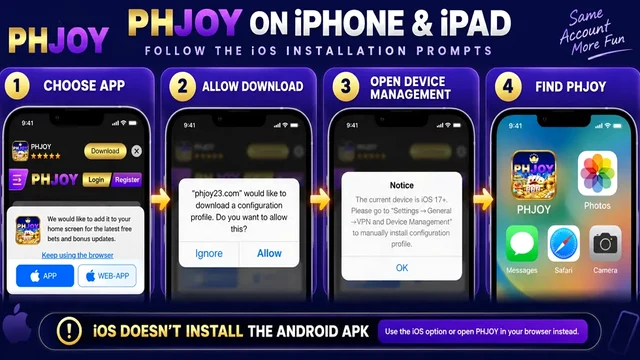




- Open in iOS Safari: Load the verified PHJOY web lobby inside Apple's native Safari browser (not inside an in-app Messenger browser).
- Tap the Bottom Share Button: Tap the square icon with an upward-pointing arrow at the bottom center of your Safari toolbar.
- Select "Add to Home Screen": Scroll down the share sheet, tap "Add to Home Screen," and tap "Add" in the top-right corner.
Why iPhone Players Use the PHJOY Safari Web App Instead of an APK
Hundreds of Filipino iPhone owners search Google every month for "phjoy apk latest version ios," hoping to find an installer file like the one Android users download. As we explain in our technical security guides, Apple's iOS operating system does not support .apk files at all, and Apple's Philippine App Store rarely keeps real-money Peso casino apps listed permanently.
Instead of forcing you to install sketchy third-party profile certificates that weaken your iPhone's security, the platform uses a Progressive Web App (PWA) built for iOS WebKit. Once pinned to your iPhone Home Screen, it launches in a clean window and connects to the exact same Peso wallet, VIP 1-50 rewards, and GCash cashier as the Android client.
| iPhone Access Method | Storage Used | iOS Security Rating | Cashier & Slot Speed |
|---|---|---|---|
| Safari "Add to Home Screen" | 0 MB installer (uses Safari cache) | 100% safe Apple sandbox | Full 60fps HTML5 slots & smooth GCash redirects |
| Messenger / Telegram In-App View | 0 MB | Safe, but blocks pop-ups | Poor; often breaks QR Ph & Maya payment pop-ups |
| Fake "iOS Enterprise Profile" Sites | 15 MB to 60 MB | Dangerous root certificate risk | High risk of phishing or sudden certificate revocation |
Fixing PHJOY iOS Safari Pop-Up Blocks & GCash Redirects
Apple's Safari browser has stricter default privacy and pop-up rules than Android Chrome. While those defaults are great for blocking annoying ads on news sites, they can accidentally block the new tab that opens when you initiate a ₱100 GCash, Maya, or QR Ph deposit.
If you tap the "Deposit" button in the cashier and nothing happens on your iPhone screen, check these two iOS Settings in under 30 seconds:
How to Allow Payment Redirects in iOS Safari
Open your iPhone Settings app, scroll down to Apps > Safari (or directly to Safari on iOS 16/17), and look at the "Block Pop-ups" toggle. Temporarily turn off Block Pop-ups when making a deposit so the payment gateway window can launch your GCash or Maya authorization screen.
Why "Prevent Cross-Site Tracking" Can Reset Live Dealer Lobbies
Live casino studios like Evolution and AE Sexy load inside an encrypted frame that talks to your main Peso wallet. If a live baccarat table keeps saying "Session Expired" on your iPhone, go to Settings > Safari and toggle off Prevent Cross-Site Tracking while you play, or launch the table in a standard Safari tab instead of Private Browsing mode.
Safari's dark "Private" tab wipes out local session cookies every time a page refreshes or switches to the GCash app. Always use a normal Safari tab (or your Home Screen shortcut) so your login token stays active while you confirm a payment.
Real Peso Bonus Question: Can iPhone Users Claim the App Angpao?
One of the biggest questions from iPhone users in Manila and Cebu is whether they miss out on the "Download App Free Angpao up to ₱8,888" because they cannot install the Android 7.68 MB APK. Here is the honest workaround if you only own an iPhone.
Some app-exclusive promos check whether your account has logged in at least once through the native Android APK shell. If a specific Angpao event requires an APK login signature, logging in via Safari alone will not trigger the red envelope. Do not fall for fake "iOS APK" sites to chase an ₱8 to ₱88 random drop; instead, stick to the standard Deposit ₱100 Get ₱119 starter offer or daily cashback rebates, which work identically on iOS Safari and Android.
You might be tempted to borrow a coworker's Android phone for two minutes just to log into your account and claim an APK-only bonus. Do not do it! If your friend already has their own casino account on that phone, logging your account into the same device hardware ID will trigger a multi-account security lock on both of your GCash cashouts.
More iOS & Mobile Guides
For a full side-by-side comparison of iOS and Android features, return to our main PHJOY Mobile App Guide. To see why third-party iOS installers are dangerous, read our breakdown of fake old-version APKs and iOS profiles, or check our honest payout and security audit.
Frequently Asked Questions
Can I download the PHJOY APK file on my iPhone or iPad?
No. APK files are strictly for Google Android devices. On an iPhone or iPad, you use the official mobile web lobby in Safari and tap Share > Add to Home Screen for one-tap access.
Why can't I find the "Add to Home Screen" button on my iPhone?
That happens when you open the link inside Facebook Messenger, Telegram, or Viber's built-in browser. Tap the compass icon or three dots in the corner to "Open in Safari," and the Share > Add to Home Screen option will appear.
Are slot RTPs and GCash cashout speeds the same on iPhone Safari as on Android?
Yes, 100% identical. All JILI, PG Soft, and Pragmatic Play slots run on the studio's central servers, and GCash or Maya withdrawals process in the exact same 5 to 15 minutes after approval regardless of whether you use an iPhone or Android.
How do I delete the Home Screen shortcut on my iPhone if I want to take a break?
Touch and hold the icon on your iPhone Home Screen until the menu pops up, then tap "Remove Bookmark." Because it is a web shortcut, it leaves zero leftover files on your device.